Dick Bain says:
Linux Bier Wanderung is next meeting in Talybont-on-Usk from the 20th to 26th of July details http://lbw2014.þþ.be/
Just thought you might like to know that it is happening and is not too far away
Dick Bain says:
Linux Bier Wanderung is next meeting in Talybont-on-Usk from the 20th to 26th of July details http://lbw2014.þþ.be/
Just thought you might like to know that it is happening and is not too far away
All,
Ubuntu has released version 14.04 LTS (Long Term Support) which means the OS will be supported for at least 5 years. Ubuntu 14.04 is available to download from:
http://releases.ubuntu.com/14.04/
A background on LTS, and the roadmap for other Ubuntu releases can be found here:
https://wiki.ubuntu.com/LTS
The Linux operating system has a built-in logging facility. The aim of logging is to log system events, in addition to application events and user events.
Why Log Events?
Having a log of events is very important for the system administrator, in order to troubleshoot errors, system faults and to understand activities performed by a user i.e. last login.
View Log Events
Log events are recorded in /var/logs
If you navigate to this folder using the CLI and ‘ls‘ you will see a number of log files.
messages – This is the generic log file for recording startup events, application events
dmesg – This records kernel messages, including boot up messages, hardware information
boot.log – This records the information that you see when Linux boots
cron – Lists cron job events
To view the above log files simply enter ‘more messages‘ to view the messages log.
Special note: dmesg is also a command i.e. typing ‘dmesg | grep -i usb‘ will return a selected list of event messages containing the keyword USB.
To search the messages for ‘usb’ try the following command:
tail -f messages | grep ‘usb’
What Next?
Familiarization with the following commands will help you navigate around the various log files:
less, more, cat, tail – use for viewing files at the CLI
grep – a very powerful utility that can be used for pattern matching/text searching
logger – enables the use to log events via the CLI
Way Forward
The above covers the basic principles of Linux logging. These log files underpin IT security monitoring capabilities and used on an enterprise scale. The next articles will cover the use of ‘syslog’ that can be used to harvest log files for intrusion detection.
The terminal under Linux provides a Command Line Interface (CLI) for entering commands to navigate around the file system, perform troubleshooting activities and to execute scripts.
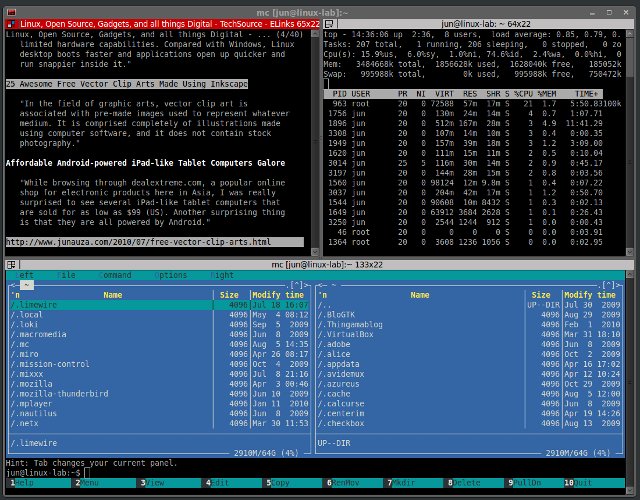
There are many different types of terminals, one of my personal favorites is the ‘Terminator’, which provides advanced layout features and the loading of profiles. If you spend a lot of your time using the CLI, for example I have an IRC application, htop (CPU performance counter), emacs (script editor) and a CLI mp3 player all running in various terminal windows. Using the terminator I can split the main window into different segments, with each segment for its own command/application.
An example is illustrated below:
Getting started:
For Debian OSs (Ubuntu/Crunchbang etc)
sudo apt-get install terminator
For CentOS/RHEL:
sudo yum install terminator
Once installed, run the application ‘terminator’
Split the screen by right click, select vertical or horizontal. When a new screen is created, follow the same process again.
Once the layout is created, right click then choose preferences. A dialog box is displayed, select Layouts tab, select Add to create the layout, and enter a name. For each terminal option you can specify a custom command i.e. top. Click close to save your changes.
To load your terminator layouts simply enter ‘terminator –layout=mylayoutname’
This can be assigned to an application launcher or desktop shortcut, or an alias via the CLI. You could have multiple layouts, maybe one for development/coding, another for personal use.
What’s wrong with Flash?
Hi
I am having to fill in a questionaire designed by SecurityMetrics to conform to PCI Compliance standards and am painfully getting fined for non-compliance. I told them I was running Ubuntu Linex and that the ports are closed. They still said I have to complete the questionare to obtain complaince.
The questions I am not sure how to answer are to do with firewall software and the configeration is to the standard they require; whether I need to install anti-virus software: and on what criticial security patches I have.
I have tried saying the above items do not apply and it comes out FAIL!
I am running Ubuntu 12-04 LTS and always get the updates.
Any help would be appreciated. Thanks.
The 2011 HOSS awards were presented to the winners by Hereford’s Mayor Councillor Anna Toon at HLUG’s Open Source Day on March 26, 2011 at All Saints, Hereford.
The HOSS award for the promotion of Open Source in the business sector went to Heather and Kevin Dontenville of OpenSure for bringing Open Source IT solutions to local enterprises.
The HOSS award for work in administration went to Dr. Ashley Tucker and the HCC/Herefordshire NHS WIMS team for beginning the process of adoption of Open Source solutions in Hereford County Council
The HOSS award for outstanding personal achievement went to Dr Tony Sales for the continuing development of the Vinux project – empowering the visually impaired around the world through free accessible software.
They are all very worthy winners and we hope that their work will inspire others to promote and contribute to Open Source projects in the county and further afield.
If you, your organisation or someone you know deserves a HOSS but you didn’t get a nomination in this year don’t worry you can enter for the 2012 HOSS Awards – just watch this space
If you would like more information about the HOSS awards please email hoss@hlug.org.uk
see the WordPress page
This is using the new TwentyFourteen theme,
but with no featured posts in the six top slots.
It has an excellent menu system and is responsive, it works well on smartphones.
But its not perfect.
I would like a list of posts with excerpts of the first 50ish words, not the full length of the latest post on the homepage like now (9Jan2014)